> ## Documentation Index
> Fetch the complete documentation index at: https://dshtauri.mintlify.site/llms.txt
> Use this file to discover all available pages before exploring further.
# 手机远程访问
> 用手机浏览器或 DSH Mobile 通过局域网与公网隧道访问电脑上的 Harness。
手机访问的是电脑上的 Harness,不在手机本地运行内核或工具。电脑需保持开机,Harness 服务与所用隧道需在线。
## 连接电脑
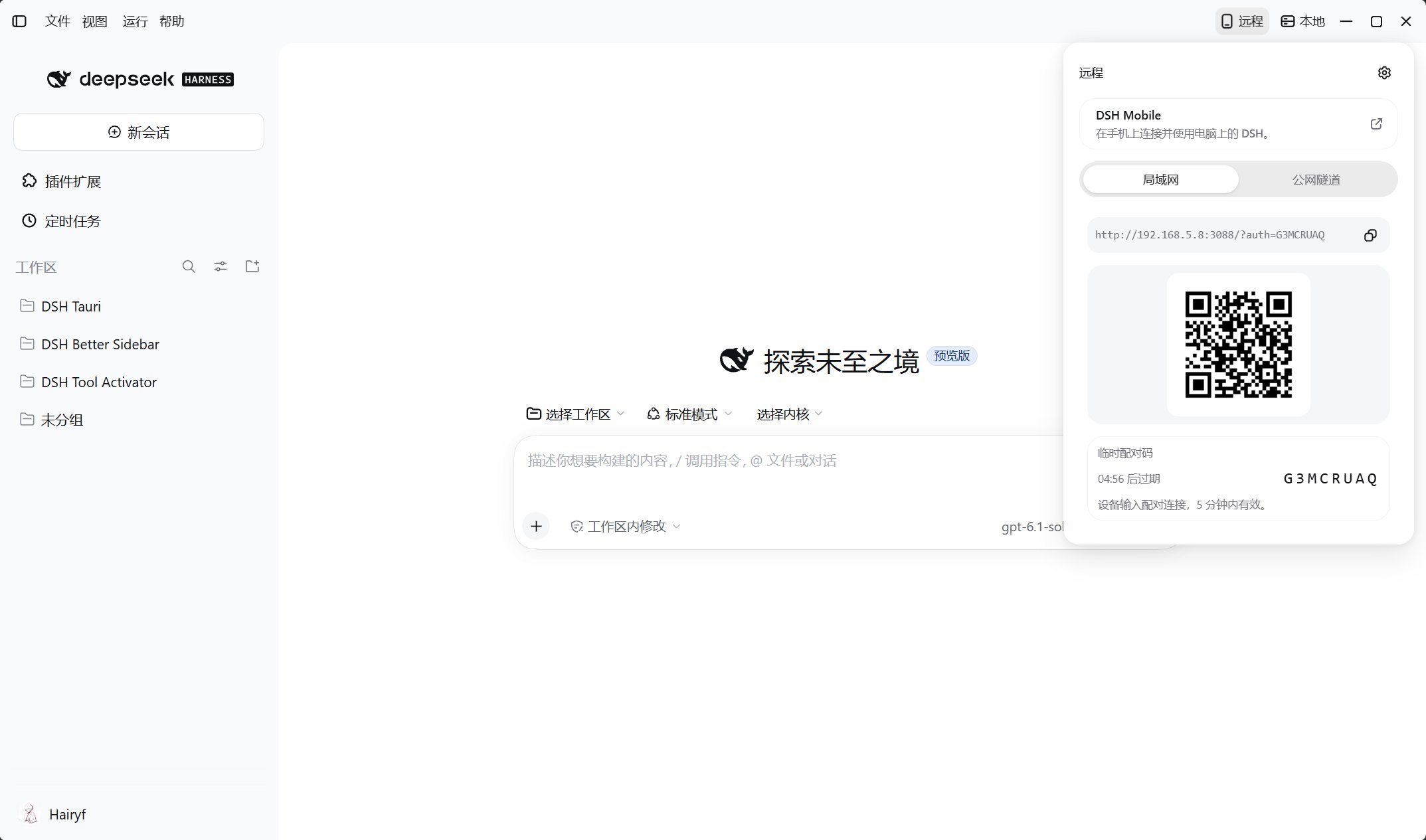
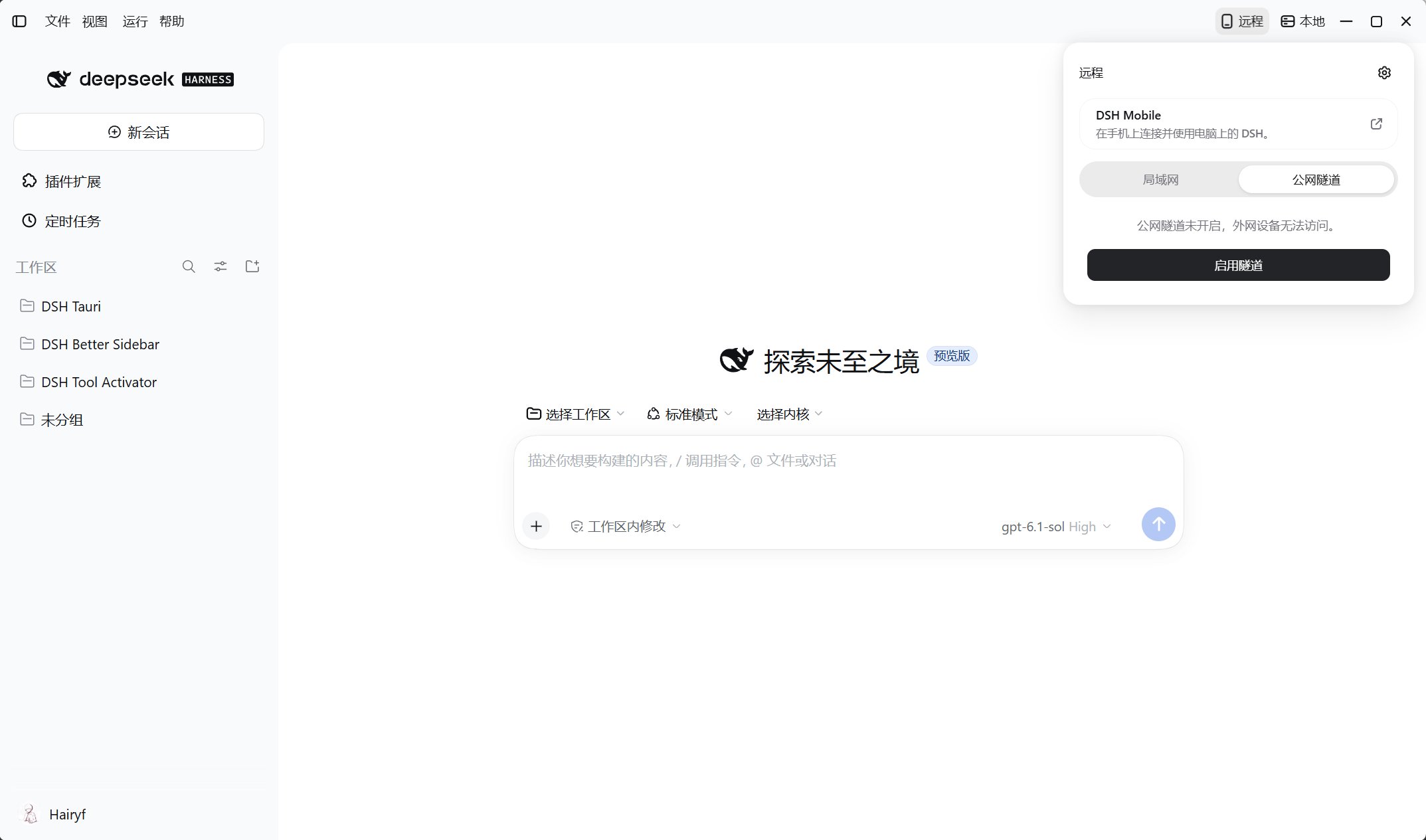
打开桌面顶部**远程**,按网络环境选择连接方式:
手机与电脑连接同一可信网络,点击**开启局域网分享**,再用手机扫码或打开链接。
 点击**启用隧道**,等待就绪后扫码或打开链接;两台设备无需在同一网络。
 需要配对时输入桌面显示的临时配对码,连接后确认能看到电脑上的会话。局域网连接失败时检查防火墙与 Wi-Fi 客户端隔离,不要使用 `127.0.0.1` 或 `localhost`。
## 远程访问设置
点击**远程**面板右上角的齿轮,或打开 Harness **设置 → 远程访问 → 远程访问**标签页。
| 设置 | 用途 |
| - | - |
| 局域网 / 监听地址 | 开关局域网分享,优先选择推荐地址;地址常变或有多网卡时可选**全部网卡** |
| 公网隧道 | Quick 免账号并分配随机域名;具名模式填写 Tunnel Token 与公开主机名,并在 Cloudflare 配置路由。查看状态,按需启动或停止 |
| 访问控制 | 获取临时配对码、生成永久访问码,或撤销全部配对授权 |
需要配对时输入桌面显示的临时配对码,连接后确认能看到电脑上的会话。局域网连接失败时检查防火墙与 Wi-Fi 客户端隔离,不要使用 `127.0.0.1` 或 `localhost`。
## 远程访问设置
点击**远程**面板右上角的齿轮,或打开 Harness **设置 → 远程访问 → 远程访问**标签页。
| 设置 | 用途 |
| - | - |
| 局域网 / 监听地址 | 开关局域网分享,优先选择推荐地址;地址常变或有多网卡时可选**全部网卡** |
| 公网隧道 | Quick 免账号并分配随机域名;具名模式填写 Tunnel Token 与公开主机名,并在 Cloudflare 配置路由。查看状态,按需启动或停止 |
| 访问控制 | 获取临时配对码、生成永久访问码,或撤销全部配对授权 |
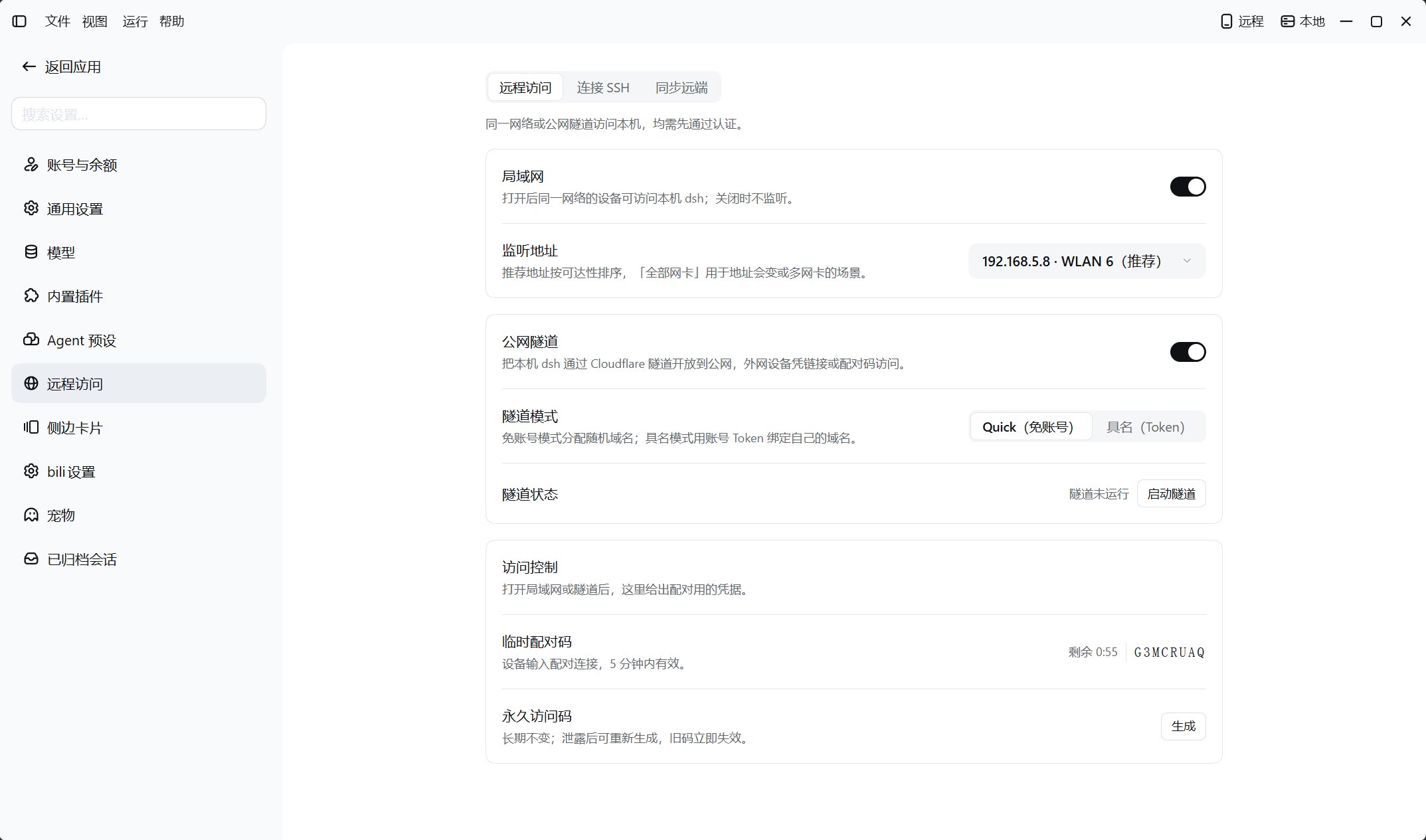 临时配对码 **5 分钟内有效**,使用后轮换;已配对设备长期记住授权。关闭分享、停止隧道或轮换永久访问码不会撤销已签发会话;使用**撤销配对授权**清除全部设备授权、会话和访问码。
界面开启分享时会启用认证。远程访问不是只读,可使用电脑上的会话、工具与已授予权限。仅授权可信设备,妥善保管链接、二维码、访问码和 Tunnel Token,不要公开无认证服务。
## 使用 DSH Mobile
从[安装与下载](../installation)获取 Android APK,或通过 iOS TestFlight 邀请安装;未签名 IPA 需自行签名。应用支持**自动扫描局域网**、**扫码连接**与最近连接,扫码需相机权限,外网使用隧道二维码。
连接后向左滑查看连接信息,长按最近连接可重命名或删除;删除记录不等同撤销电脑端授权。
[SSH 连接远端机器](../built-in-plugins/dsh-tauri-remote) · [故障排除](../help/troubleshooting)
This documentation is built and hosted on [Mintlify](https://mintlify.com), a developer documentation platform.
临时配对码 **5 分钟内有效**,使用后轮换;已配对设备长期记住授权。关闭分享、停止隧道或轮换永久访问码不会撤销已签发会话;使用**撤销配对授权**清除全部设备授权、会话和访问码。
界面开启分享时会启用认证。远程访问不是只读,可使用电脑上的会话、工具与已授予权限。仅授权可信设备,妥善保管链接、二维码、访问码和 Tunnel Token,不要公开无认证服务。
## 使用 DSH Mobile
从[安装与下载](../installation)获取 Android APK,或通过 iOS TestFlight 邀请安装;未签名 IPA 需自行签名。应用支持**自动扫描局域网**、**扫码连接**与最近连接,扫码需相机权限,外网使用隧道二维码。
连接后向左滑查看连接信息,长按最近连接可重命名或删除;删除记录不等同撤销电脑端授权。
[SSH 连接远端机器](../built-in-plugins/dsh-tauri-remote) · [故障排除](../help/troubleshooting)
This documentation is built and hosted on [Mintlify](https://mintlify.com), a developer documentation platform.